
T2202
T2202 tuition certificate explained
What the CRA T2202 tuition slip shows, when your school issues it, and how the amounts flow to Schedule 11 and line 32300.

Step 01
What a T2202 is
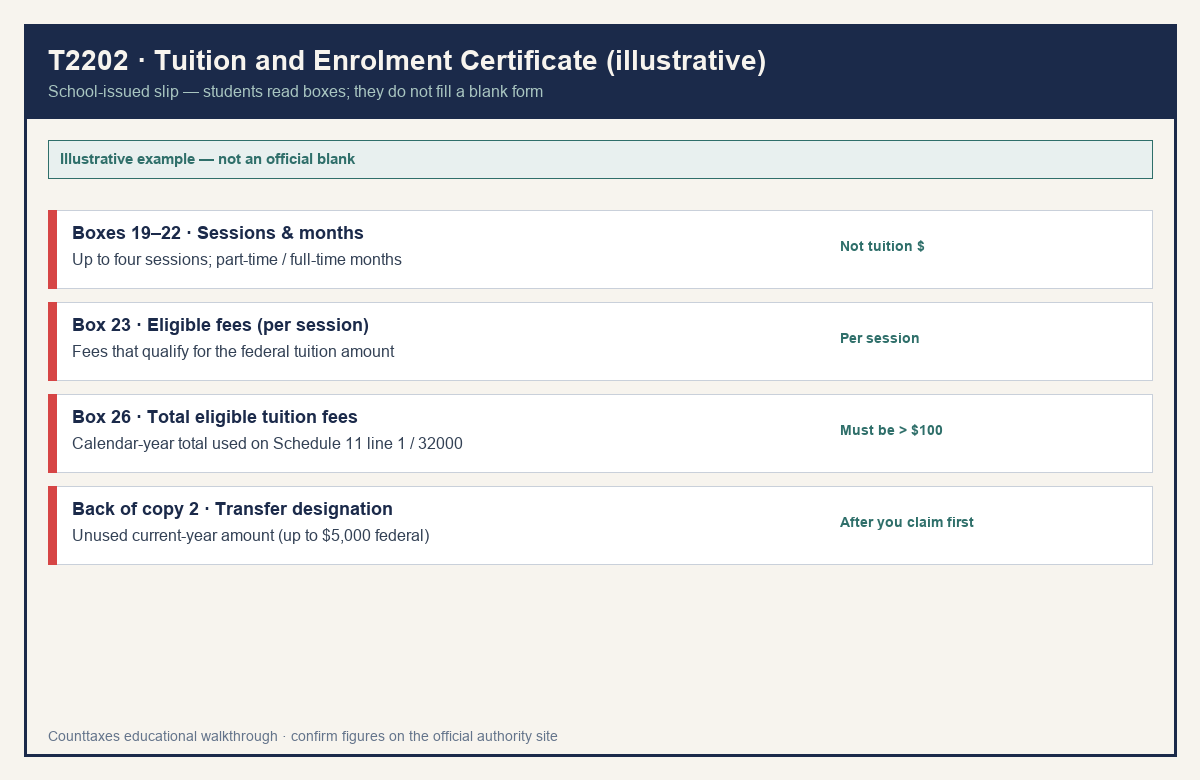
The T2202 is the Tuition and Enrolment Certificate. It’s a slip issued by your school, which Canada’s tax agency requires every designated educational institution to prepare for each qualifying student. You don’t fill it out. You read it, and use the numbers when you do your return. The slip shows the school, the program, your student number, the dates of each session, how many months you were enrolled part-time or full-time, and the eligible tuition fees you paid for the year. A single slip can list up to four sessions. Your school also files the slip with CRA, so the numbers on your copy and CRA’s records should match.
| Callout | What it means | Common mistake |
|---|---|---|
| Year (top right) | Calendar year the slip covers | Claiming it a year late because the slip arrived in February |
| Boxes 19–22 | Session dates and part-time / full-time months | Treating months as your tuition amount |
| Box 23 | Eligible tuition fees for that session | Adding Box 23 to Box 26 (double counting) |
| Boxes 24–26 | Total months and total eligible tuition fees | Using Box 26 without checking the $100 rule |
| Back of copy 2 | Designate a transfer to spouse / parent / grandparent | Forgetting to claim your own amount first |
The federal education and textbook credits were eliminated in 2017. A slip showing months of enrolment doesn’t create a federal education amount. For provincial or territorial amounts, check your province’s rules.
Step 02
Where to get it
Your school issues it. CRA’s rules say schools must give you your T2202, and file it with CRA, on or before the last day of February following the year it covers. So tuition paid in 2025 is reported on a slip due by the end of February 2026. Schools can make the slip available through a secure student portal where you can print it. With your written consent, they can also email it. Otherwise, or if you ask, they provide two paper copies in person or by mail. The second copy has a section on the back for transferring your unused tuition to someone else. If you haven’t received yours, contact your school. CRA says to do that first. Some schools issue an official tax receipt showing eligible tuition fees instead, and that works for the claim. We can’t help with your school’s portal or login. That part is up to your school’s student accounts or registrar’s office. If you studied outside Canada, you may get a different certificate (TL11A, TL11C or TL11D) instead. The numbers are used in the same way.
Check that each school’s total is more than $100 for the calendar year. CRA says fees at any one institution must exceed $100 to be claimed.
Step 03
On your return
Your return doesn’t copy the slip directly. You work through Schedule 11, which is filed with your T1 even if someone else paid your fees. Here’s the path CRA describes. Put your eligible tuition fees from the slip on line 1 (line 32000) of Schedule 11. Add any unused tuition amount from past years that’s shown on last year’s notice of assessment (line 9). The total federal tuition amount from line 17 goes to line 32300 on your return. You claim the amount that reduces your tax. Any unused current-year amount can be transferred or carried forward. You can transfer up to $5,000 of your current-year federal tuition amount, minus what you used yourself, to a spouse or common-law partner, or to their parent or grandparent, or to your parent or grandparent. You designate the person on the back of the second copy of your T2202. They claim it on line 32400 of their return. If you carry an amount forward instead, you can’t transfer it later. You also need to file a return and Schedule 11 each year, or the amount won’t carry forward. Paper filers attach Schedule 11 but not the slip. If you file online, keep the slip in case CRA asks. The tuition credit lowers the tax on your return, but it doesn’t change your paycheque on its own. If you claim amounts such as tuition on your TD1, your employer can deduct less tax from your pay. To see how your take-home pay changes either way, use the Counttaxes Canada take-home calculator.
Fees paid or reimbursed by an employer, or by a job-training program, where that money isn’t taxed as your income, can’t be claimed.
Official source
Always prefer the current-year instructions over this outline.
Keep reading
Related Canada guides
 T1
How to fill out a T1
A plain-language overview of the T1 Income Tax and Benefit Return — slips, schedules, and when software vs paper applies. Not a filing service.
 TD1
How to fill out a TD1
What the CRA TD1 form does, how to claim the basic personal amount, federal vs provincial forms, and what to enter with two jobs.