
Form W-4
How to fill out a W-4
How to fill out the 2026 IRS Form W-4 — filing status, multiple jobs, dependents ($2,200 / $500), and when to use the IRS withholding estimator.

Step 01
Download the official blank form
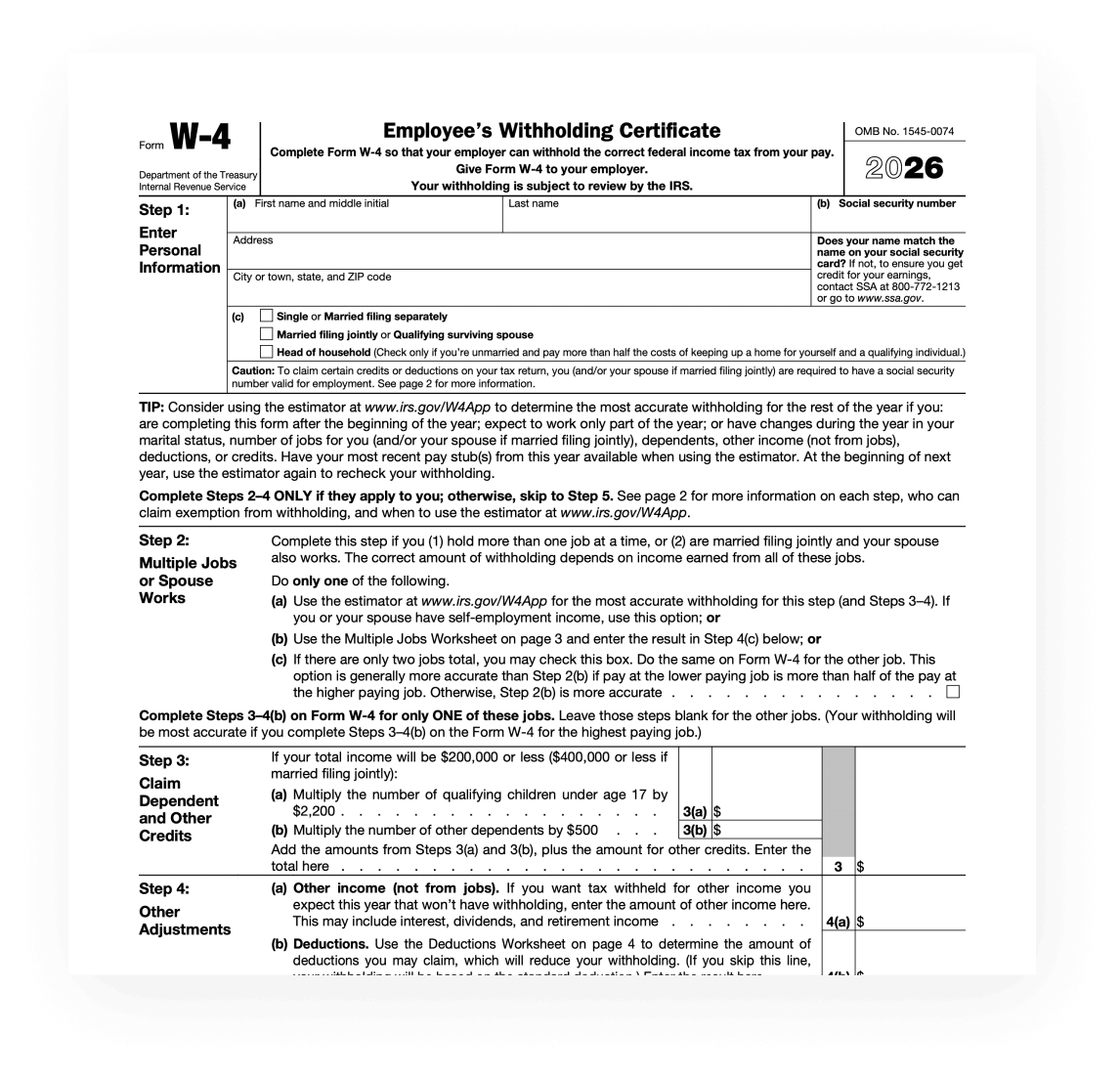
Download the 2026 Form W-4 from IRS.gov (About Form W-4 → current Form W-4 PDF). Prefer the official PDF over third-party “fillable W-4” sites. Open it in a PDF reader if your browser garbles the worksheets on pages 3–4. • Form PDF: irs.gov/pub/irs-pdf/fw4.pdf • Hub: irs.gov/forms-pubs/about-form-w-4 • Estimator: irs.gov/W4App
Step 02
What a W-4 is
Form W-4 is the Employee’s Withholding Certificate. You complete it so your employer can withhold the correct federal income tax from your pay. Give the signed form to your employer — you do not mail it to the IRS as your tax return. If too little is withheld, you generally owe tax (and may owe a penalty) when you file. If too much is withheld, you generally get a refund. Complete a new W-4 when changes to your personal or financial situation would change the entries on the form. See Pub. 505 for more detail. The modern W-4 does not use “allowances.” Ignore old advice about “claiming 0 or 1.”
Social Security and Medicare (FICA) are not set on the W-4. Those rates are fixed by law.
Step 03
Step 1 — Personal information and filing status
Enter your name, address, and Social Security number. Check that your name matches your Social Security card; if not, contact SSA so earnings are credited correctly. In Step 1(c), check only one anticipated filing status: Single or Married filing separately; Married filing jointly or Qualifying surviving spouse; or Head of household (only if unmarried and you pay more than half the cost of keeping up a home for yourself and a qualifying individual). Filing status drives the standard deduction and tax rates used to compute withholding. Complete Steps 2–4 only if they apply; otherwise skip to Step 5.
IRS tip: use the estimator at irs.gov/W4App if you are mid-year, work only part of the year, or expect changes in jobs, dependents, other income, deductions, or credits. Have recent pay stubs handy.
Step 04
Step 2 — Multiple jobs or spouse works
Complete this step if you hold more than one job at a time, or if you are married filing jointly and your spouse also works. Submit a separate W-4 for each job. Do only one of: (a) use the IRS estimator (most accurate — use this if you or your spouse have self-employment income); (b) use the Multiple Jobs Worksheet on page 3 and enter the result in Step 4(c); or (c) if there are only two jobs total, check the box on both jobs’ W-4s. Complete Steps 3–4(b) on only one Form W-4 — preferably the highest-paying job. Leave those steps blank on the other jobs.
Checking the two-job box cuts the standard deduction and tax brackets in half for each job. Accurate when pay is similar; otherwise more tax than necessary may be withheld.
Step 05
Step 3 — Dependents and other credits
If your total income will be $200,000 or less ($400,000 or less if married filing jointly), use Step 3 to account for credits that lower your tax.
| Item | Amount / rule | Common mistake |
|---|---|---|
| Qualifying children under age 17 | Multiply by $2,200 each | Using outdated $2,000 figures from old articles |
| Other dependents | Multiply by $500 each | Claiming someone who is not your dependent |
| Other credits (optional) | Add estimated education / foreign tax credits etc. | Overstating credits and under-withholding |
| Income ceiling | Skip Step 3 amounts if over $200k ($400k MFJ) | Entering credits when over the form’s income test |
Including credits here increases your paycheck and can reduce any refund when you file. Eligibility: Pub. 501.
Step 06
Step 4 — Other adjustments
Step 4(a): other income not from jobs (interest, dividends, retirement) that will not have withholding. Step 4(b): deductions beyond the basic standard deduction — use the Deductions Worksheet on page 4 (itemizing, student loan interest, IRA, and 2026 worksheet lines for qualified tips, overtime, passenger vehicle loan interest, and seniors age 65+ subject to the worksheet’s income caps). Step 4(c): extra tax you want withheld each pay period (including Multiple Jobs Worksheet amounts). Enter a per-paycheck figure, not an annual total.
Step 07
Exempt from withholding
You may claim exemption for 2026 only if you had no federal income tax liability in 2025 and you expect none in 2026. Check the exempt box, then complete only Steps 1(a), 1(b), and 5. You must submit a new Form W-4 for 2027 by February 16, 2027.
Claiming exempt while you still owe tax can mean a balance due and penalties when you file.
Step 08
Step 5 — Sign and give to your employer
Sign and date under penalties of perjury. The form is not valid without a signature. Your employer completes the employer-only section (name, address, first date of employment, EIN).
Step 09
Check take-home after you submit
After HR updates withholding, compare a few pay stubs. Re-run the IRS estimator if something looks off. For an educational federal + state take-home estimate (not a substitute for the IRS tool), use the Counttaxes US calculator for your state.
Estimates only — not tax advice. Confirm with the IRS Form W-4 instructions and Pub. 505.
Official source
Always prefer the current-year instructions over this outline.
Keep reading
Related United States guides
 US paycheck
How a US paycheck works
How US paychecks withhold federal income tax, Social Security, and Medicare — plus how state lines and pre-tax deductions change take-home.
 Pay stub
How to read a pay stub
Gross, taxes, and deductions on a US paycheck — so you can spot what changed and estimate take-home.
 Form W-2
How to read a W-2
Decode wage and tax boxes on Form W-2 so you know what your employer reported — and what feeds your 1040.